/
Map Tours & Overview
Map Tours & Overview
- Lisa Tubb (Unlicensed)
- Amelia Smith (Unlicensed)
Owned by Lisa Tubb (Unlicensed)
The Smartrak Map Site enables users to have full visibility of their fleet and assets via their workstation or mobile device.
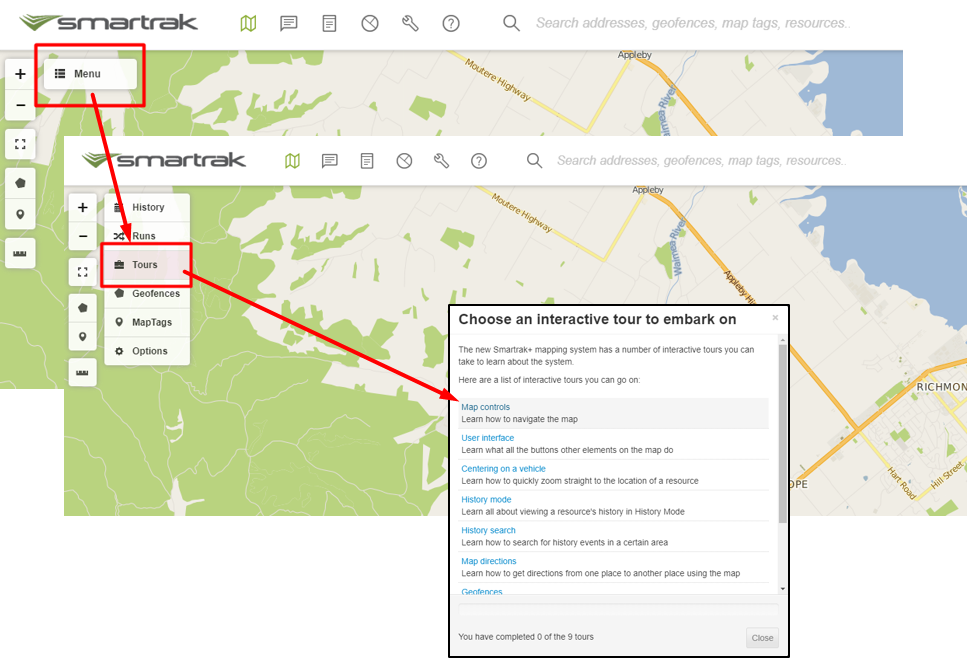
The Smartrak Map has 9 interactive built in tours to help you learn about the system.
| The tours include;
|
Map User | Self Help | Service Desk | Knowledge Base | Trouble shooting | Smartrak Portfolios
Related content
Additional Features & Historical Information
Additional Features & Historical Information
More like this
Overview of Smartrak App Site Home Screen
Overview of Smartrak App Site Home Screen
More like this
Smartrak Reporting
Smartrak Reporting
Read with this
Archived - *Built in navigation tour
Archived - *Built in navigation tour
More like this
Creating, Assigning & Managing Groups
Creating, Assigning & Managing Groups
Read with this
Map Features & Customising your Map
Map Features & Customising your Map
More like this